

1. Get your endpoint URL
1
Create the source
Settings → Lead Management → Lead sources → + Add new source. Give it a name; optionally a
plan name and per-lead price.
2
Copy the URL
In the URLs column, click the copy icon next to Lead save URL.
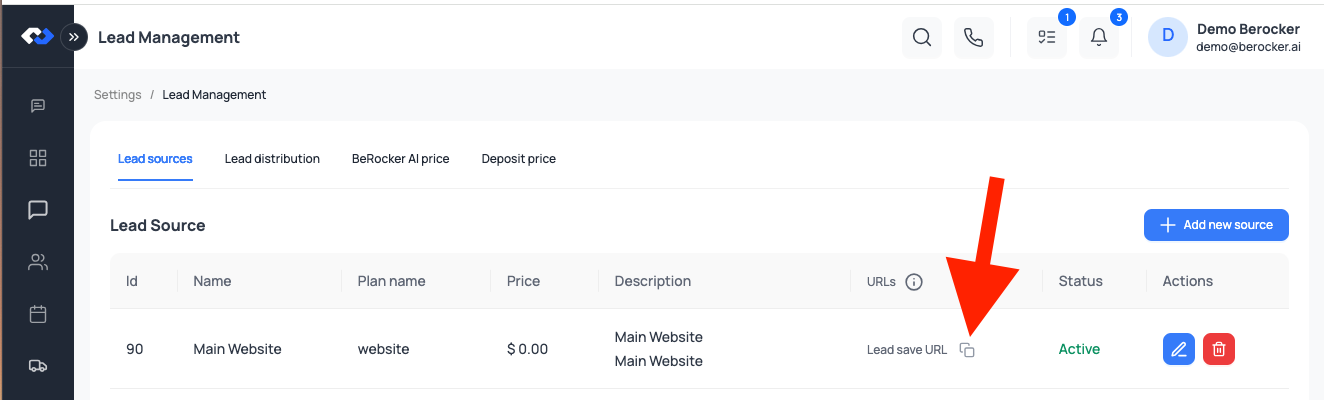
The key is embedded in the URL, so authentication is built in — there is no separate token to send.
Some sources also expose a hot lead URL for providers that flag urgent leads.
2. Request
3. Payload
Required
Customer and route
The shipment
Each vehicle
Vehicle types:
Car, sedan, Coupe, Convertible, SUV, Van, Pickup,
pickup_2_doors, pickup_4_doors, Motorcycle, ATV, Boat, RV, Travel Trailer, Other.
A lead containing a custom vehicle skips the automatic quote and is routed to an agent for
manual pricing instead — a travel trailer should not be auto-quoted like a sedan.
4. Example
5. What happens next
1
The lead is created
Attributed to the source whose URL you posted to.
2
It is assigned
Per your lead distribution rota — quotas, shift hours, and the
after-hours fallback.
3
It may be quoted automatically
If Auto Price is on in Pricing, and no vehicle is custom.
Testing and troubleshooting
Send one lead with your own name and phone number and watch it arrive.Related
Lead sources
Create the source and get the URL.
Lead distribution
Who receives these leads.