

Not done yet? Start with
SendGrid — account and domain setup.
What BeRocker asks for
Connect it
1
Open Integrations
Settings → Integrations → SendGrid → Configure.
2
Paste the API key and domain
Set Status to Active.
3
Save
The card should show Status: Active in green.
4
Point your email address at it
Settings → Profile → User Contacts → add an entry with Channel = Email,
Provider = SendGrid, your sending address, and tick Is Default?.→ Profile
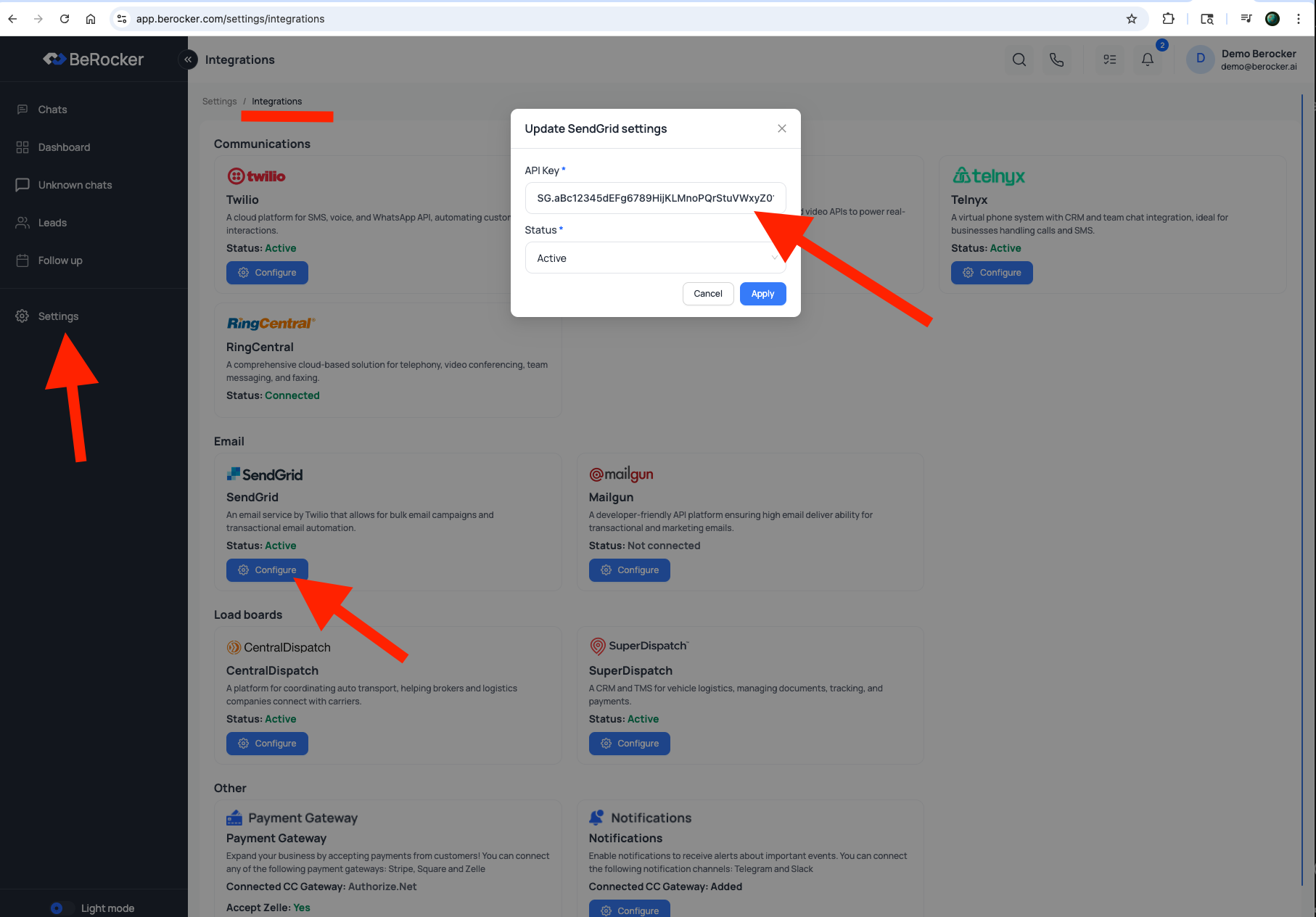
Step-by-step walkthrough
The recording predates the Domain field. Fill that in too — the steps are otherwise identical.
Before you send at volume
Domain authentication alone is not enough. Get SPF, DKIM and DMARC right or your quotes end up in spam. → Email deliverabilityTroubleshooting
Related
Email deliverability
SPF, DKIM and DMARC.
Profile
Set your default email contact.