This guide explains how to connect your lead provider or website form to BeRocker CRM by sending POST requests. Follow the steps carefully to ensure your leads are captured correctly.
1. Create a Lead Source & Get Endpoint URL
Step 1 — Settings page
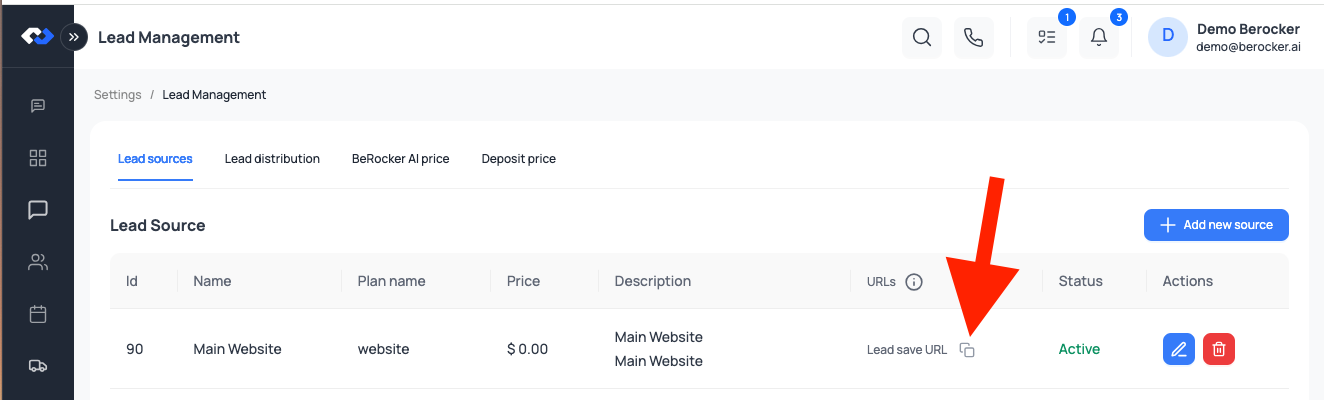
Go to Settings → Lead Management → Lead Sources in your BeRocker CRM.
Step 2 — Add New Source
Click Add New Source and give it a name (e.g., Main Website).
- Required: Name
- Optional: (Only when connecting with Lead Source Provider)
- Plan Name — If your lead provider specifies a plan
- Price — If your provider charges per lead
Step 3 — Copy Endpoint URL
After saving, copy the Endpoint URL from the URLs column using the copy icon.
When sending a POST request, include the following header:
Content-Type: application/json
3. JSON Payload Structure to follow
Most lead providers (e.g., MessagePlan, BATS) require this format:
{
  "first_name": "John",
  "last_name": "Doe",
  "email": "user@example.com",
  "phone": "5551234567",
  "origin_city": "Los Angeles",
  "origin_state": "CA",
  "origin_postal_code": "90001",
  "destination_city": "Miami",
  "destination_state": "FL",
  "destination_postal_code": "33101",
  "vehicles": [
    {
      "vehicle_model_year": 2020,
      "vehicle_make": "Toyota",
      "vehicle_model": "Camry",
      "vehicle_inop": false,
      "vehicle_type": "Car"
    }
  ],
  "ship_date": "2025-03-27",
  "transport_type": "open",
  "comment_from_shipper": "Please call after 5 PM"
}
4. Example Request
curl -X POST "https://your-endpoint-url" \
-H "Content-Type: application/json" \
-d '{
  "first_name": "John",
  "last_name": "Doe",
  "email": "user@example.com",
  "phone": "5551234567",
  "origin_city": "Los Angeles",
  "origin_state": "CA",
  "origin_postal_code": "90001",
  "destination_city": "Miami",
  "destination_state": "FL",
  "destination_postal_code": "33101",
  "vehicles": [
    {
      "vehicle_model_year": 2020,
      "vehicle_make": "Toyota",
      "vehicle_model": "Camry",
      "vehicle_inop": false,
      "vehicle_type": "Car"
    }
  ],
  "ship_date": "2025-03-27",
  "transport_type": "open",
  "comment_from_shipper": "Please call after 5 PM"
}'
5. Server Responses
Successful Submission: The server will return an HTTP status 200 OK along with a JSON response confirming the lead receipt.
• Error Handling: In case of errors, the server may return:
• 400 Bad Request — Incorrect request format.
• 401 Unauthorized — Authentication issues.
• Other HTTP error codes along with an appropriate error message.
6. Accepted vehicle type values
sedan
Car
Boat
Motorcycle
Pickup
pickup_2_doors
SUV
Van
RV
Travel Trailer
ATV
Convertible
Coupe
Other
7. Accepted Transport Types
✅ That’s it! You’re now ready to send leads directly into BeRocker CRM.

