> ## Documentation Index
> Fetch the complete documentation index at: https://help.berocker.com/llms.txt
> Use this file to discover all available pages before exploring further.
# Accounting
> Every payment, refund, dispute and processing fee across your whole organization, in one table.
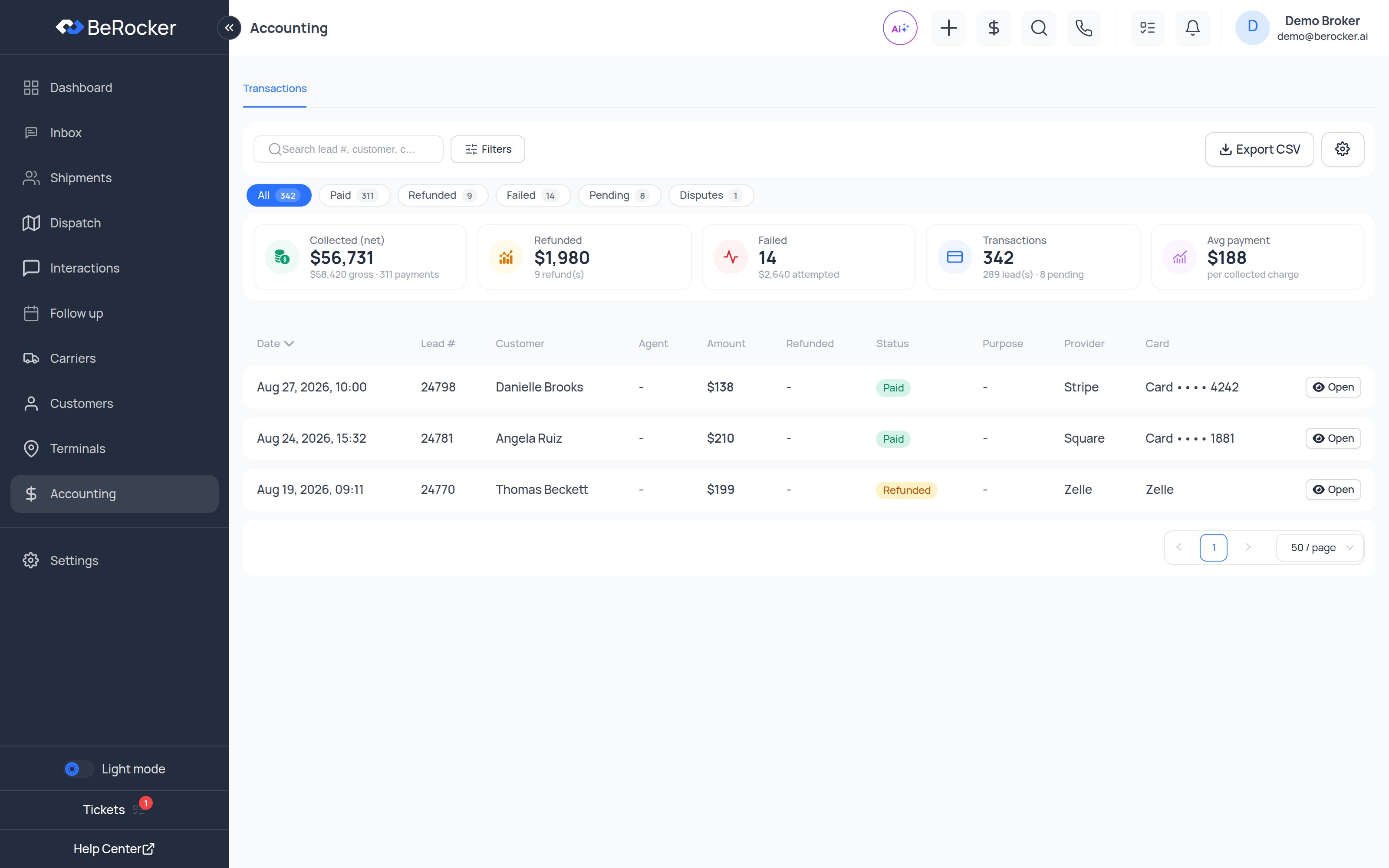
**Accounting** is the organization-wide money view: every transaction on every shipment, whoever
took it. By default it is available to admins and managers, and can be opened up to other roles
from the roles screen.
 ***
## The stats strip
| Figure | What it counts |
| ------------------- | ------------------------------------------- |
| **Transactions** | Every transaction in the filtered period. |
| **Leads** | How many distinct shipments they belong to. |
| **Collected** | How many succeeded. |
| **Gross collected** | Total charged, before processing fees. |
| **Net collected** | What actually reached you after fees. |
| **Refunded** | Amount and count refunded. |
| **Failed** | Amount and count of declines. |
| **Pending** | Payments still processing. |
| **Disputes** | Chargebacks opened. |
Gross minus net is the processor's cut. If that gap looks wrong, check which processor is default
in [Payment gateways](/settings/integrations).
***
## Transaction statuses
| Status | Meaning |
| --------------------------------------- | ---------------------------------------------------- |
| **Paid** | Succeeded. |
| **Processing** | Submitted, not settled yet. |
| **Link sent** | A payment link was issued and has not been paid yet. |
| **Failed** | Declined or errored. |
| **Canceled** | Called off before it went through. |
| **Refunded** / **Partially refunded** | Money returned in full or in part. |
| **Dispute opened** / **Dispute closed** | A chargeback was raised, and its outcome. |
**Link sent** is not money. Authorize.Net payment links die after **15 minutes** and can only be
paid once, so a link an agent sent half an hour ago is a dead URL — send a fresh one. Stripe
Checkout links last 24 hours; Square and RevitPay links stay up until they are paid.
***
## What each charge was for
| Purpose | Meaning |
| --------------------------- | ---------------------------------------------------------- |
| **Deposit / first payment** | The reservation fee taken at booking. |
| **Full shipment cost** | The whole amount, when the customer pays in full up front. |
| **Additional charge** | Anything extra added later. |
This mirrors the shipment's payment plan: **Reservation only** (deposit now, balance to the carrier
on delivery) or **Full payment**.
***
## Card payments vs recorded payments
Two different things live in this table.
**Card processors** actually charge the customer: Stripe, Square, Authorize.Net, RevitPay and
QuickBooks.
**Manual methods** are record-only — the customer sends the money themselves and an agent records
it with a receipt attached. Nothing is ever charged: Zelle, Venmo, PayPal, Cash App, and **Other**
for anything else (wire, check, cash, a regional app).
***
## Filtering and exporting
Filter by status, purpose, payment provider, agent and date range, then export the result. Open any
transaction for the full detail, including the shipment it belongs to and the fee breakdown.
***
## Processing fees on credit cards
If your organization passes the card processing fee on to customers, it can only be charged on
credit cards and waived for debit and prepaid — and that requires a processor that reports how a
card is funded. **Stripe**, **Square** and **Authorize.Net** do. Other processors do not, so the
customer-facing wording must not promise the debit waiver when one of those is your default.
***
## Related
Connect and choose your default processor.
Deposit amounts and fee ranges.
The same money rolled up into KPIs.
User charges and lead-source reports.
***
## The stats strip
| Figure | What it counts |
| ------------------- | ------------------------------------------- |
| **Transactions** | Every transaction in the filtered period. |
| **Leads** | How many distinct shipments they belong to. |
| **Collected** | How many succeeded. |
| **Gross collected** | Total charged, before processing fees. |
| **Net collected** | What actually reached you after fees. |
| **Refunded** | Amount and count refunded. |
| **Failed** | Amount and count of declines. |
| **Pending** | Payments still processing. |
| **Disputes** | Chargebacks opened. |
Gross minus net is the processor's cut. If that gap looks wrong, check which processor is default
in [Payment gateways](/settings/integrations).
***
## Transaction statuses
| Status | Meaning |
| --------------------------------------- | ---------------------------------------------------- |
| **Paid** | Succeeded. |
| **Processing** | Submitted, not settled yet. |
| **Link sent** | A payment link was issued and has not been paid yet. |
| **Failed** | Declined or errored. |
| **Canceled** | Called off before it went through. |
| **Refunded** / **Partially refunded** | Money returned in full or in part. |
| **Dispute opened** / **Dispute closed** | A chargeback was raised, and its outcome. |
**Link sent** is not money. Authorize.Net payment links die after **15 minutes** and can only be
paid once, so a link an agent sent half an hour ago is a dead URL — send a fresh one. Stripe
Checkout links last 24 hours; Square and RevitPay links stay up until they are paid.
***
## What each charge was for
| Purpose | Meaning |
| --------------------------- | ---------------------------------------------------------- |
| **Deposit / first payment** | The reservation fee taken at booking. |
| **Full shipment cost** | The whole amount, when the customer pays in full up front. |
| **Additional charge** | Anything extra added later. |
This mirrors the shipment's payment plan: **Reservation only** (deposit now, balance to the carrier
on delivery) or **Full payment**.
***
## Card payments vs recorded payments
Two different things live in this table.
**Card processors** actually charge the customer: Stripe, Square, Authorize.Net, RevitPay and
QuickBooks.
**Manual methods** are record-only — the customer sends the money themselves and an agent records
it with a receipt attached. Nothing is ever charged: Zelle, Venmo, PayPal, Cash App, and **Other**
for anything else (wire, check, cash, a regional app).
***
## Filtering and exporting
Filter by status, purpose, payment provider, agent and date range, then export the result. Open any
transaction for the full detail, including the shipment it belongs to and the fee breakdown.
***
## Processing fees on credit cards
If your organization passes the card processing fee on to customers, it can only be charged on
credit cards and waived for debit and prepaid — and that requires a processor that reports how a
card is funded. **Stripe**, **Square** and **Authorize.Net** do. Other processors do not, so the
customer-facing wording must not promise the debit waiver when one of those is your default.
***
## Related
Connect and choose your default processor.
Deposit amounts and fee ranges.
The same money rolled up into KPIs.
User charges and lead-source reports.