> ## Documentation Index
> Fetch the complete documentation index at: https://help.berocker.com/llms.txt
> Use this file to discover all available pages before exploring further.
# Messaging health
> What your automated messaging is doing right now — the queue, how each sending number is performing, and the limits behind both.
**Settings → Templates → Health** answers the question every other messaging screen dodges:
*what is actually happening right now?*
> What the automated messaging is doing right now — what is queued and roughly how long it will take
> to clear, how each sending number is really performing, and the limits behind both. Delivery
> figures count only messages the network gave a definite answer about, and how much of the traffic
> that was is shown beside them.
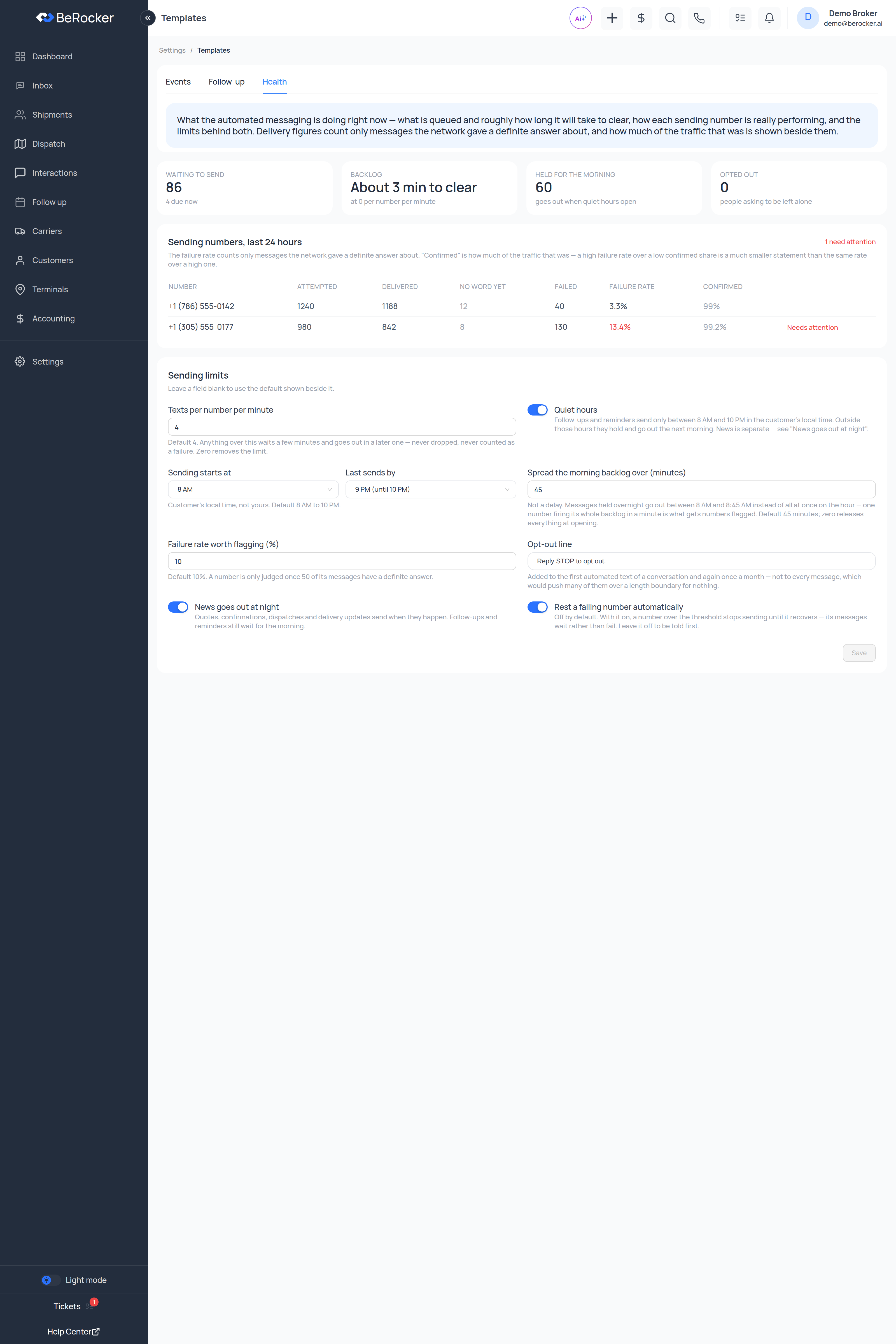 ***
## The four tiles
| Tile | What it tells you |
| ------------------------ | ------------------------------------------------------------------------------------- |
| **Waiting to send** | How many messages are queued, with how many are **due now**. |
| **Backlog** | Roughly how long the queue takes to clear, at the current per-number-per-minute rate. |
| **Held for the morning** | Messages the quiet window is holding. They go out when quiet hours open. |
| **Opted out** | People asking to be left alone. |
A big **held for the morning** number is normal, not a fault — it is tonight's follow-ups queued
up for the morning release.
***
## Sending numbers, last 24 hours
One row per number, with a **"N need attention"** counter in the corner.
| Column | What it is |
| ---------------- | --------------------------------------------------------------- |
| **Number** | The sending number. |
| **Attempted** | Messages sent from it. |
| **Delivered** | Confirmed delivered. |
| **No word yet** | Sent, no outcome reported. |
| **Failed** | Confirmed failures. |
| **Failure rate** | Failures as a share of messages with a definite answer. |
| **Confirmed** | How much of this number's traffic got a definite answer at all. |
A number in trouble is flagged **Needs attention** in red.
Read the two together, as the screen itself says:
> The failure rate counts only messages the network gave a definite answer about. "Confirmed" is
> how much of the traffic that was — a high failure rate over a low confirmed share is a much
> smaller statement than the same rate over a high one.
A number marked **Needs attention** is on its way to being blocked by carriers. Rest it, check
what you have been sending from it, and make sure your opt-out line is on.
***
## Sending limits
> Leave a field blank to use the default shown beside it.
| Setting | What it does |
| --------------------------------------------- | --------------------------------------------------------------------------------------------------------------------------------------------------------------------------------------------------------------------------------------- |
| **Texts per number per minute** | *Default 4.* Anything over this waits a few minutes and goes out in a later one — never dropped, never counted as a failure. Zero removes the limit. |
| **Quiet hours** | Follow-ups and reminders send only between the hours below, in the **customer's** local time. Outside them they hold and go out the next morning. |
| **Sending starts at** / **Last sends by** | The open window. *Customer's local time, not yours. Default 8 AM to 10 PM.* |
| **Spread the morning backlog over (minutes)** | *Default 45.* Not a delay — messages held overnight go out between 8:00 and 8:45 instead of all at once on the hour. One number firing its whole backlog in a minute is what gets numbers flagged. Zero releases everything at opening. |
| **Failure rate worth flagging (%)** | *Default 10%.* A number is only judged once **50** of its messages have a definite answer. |
| **Opt-out line** | Added to the first automated text of a conversation and again once a month — not to every message, which would push many of them over a length boundary for nothing. |
| **News goes out at night** | Quotes, confirmations, dispatches and delivery updates send when they happen. Follow-ups and reminders still wait for the morning. |
| **Rest a failing number automatically** | *Off by default.* With it on, a number over the threshold stops sending until it recovers — its messages wait rather than fail. Leave it off to be told first. |
Click **Save** when you are done.
Quiet hours are worked out in the **customer's** local time, using your organization's time zone
as the base. If the time zone in [Business settings](/settings/business) is wrong, this is wrong
too.
***
## "The texts are not going out"
Work down this list:
Check **Waiting to send** and **Backlog**. If the backlog is shrinking, it is going out — just
not yet.
A large **Held for the morning** count means exactly that.
Look for **Needs attention**, and whether **Rest a failing number automatically** is on.
A low **texts per number per minute** with a big queue is slow by design. **Backlog** tells you
how slow.
Back to [Templates](/settings/templates) — an inactive template never sends.
No default SMS contact means nothing sends at all. See [Profile](/settings/profile).
***
## Related
The messages themselves.
The same problem, for email.
***
## The four tiles
| Tile | What it tells you |
| ------------------------ | ------------------------------------------------------------------------------------- |
| **Waiting to send** | How many messages are queued, with how many are **due now**. |
| **Backlog** | Roughly how long the queue takes to clear, at the current per-number-per-minute rate. |
| **Held for the morning** | Messages the quiet window is holding. They go out when quiet hours open. |
| **Opted out** | People asking to be left alone. |
A big **held for the morning** number is normal, not a fault — it is tonight's follow-ups queued
up for the morning release.
***
## Sending numbers, last 24 hours
One row per number, with a **"N need attention"** counter in the corner.
| Column | What it is |
| ---------------- | --------------------------------------------------------------- |
| **Number** | The sending number. |
| **Attempted** | Messages sent from it. |
| **Delivered** | Confirmed delivered. |
| **No word yet** | Sent, no outcome reported. |
| **Failed** | Confirmed failures. |
| **Failure rate** | Failures as a share of messages with a definite answer. |
| **Confirmed** | How much of this number's traffic got a definite answer at all. |
A number in trouble is flagged **Needs attention** in red.
Read the two together, as the screen itself says:
> The failure rate counts only messages the network gave a definite answer about. "Confirmed" is
> how much of the traffic that was — a high failure rate over a low confirmed share is a much
> smaller statement than the same rate over a high one.
A number marked **Needs attention** is on its way to being blocked by carriers. Rest it, check
what you have been sending from it, and make sure your opt-out line is on.
***
## Sending limits
> Leave a field blank to use the default shown beside it.
| Setting | What it does |
| --------------------------------------------- | --------------------------------------------------------------------------------------------------------------------------------------------------------------------------------------------------------------------------------------- |
| **Texts per number per minute** | *Default 4.* Anything over this waits a few minutes and goes out in a later one — never dropped, never counted as a failure. Zero removes the limit. |
| **Quiet hours** | Follow-ups and reminders send only between the hours below, in the **customer's** local time. Outside them they hold and go out the next morning. |
| **Sending starts at** / **Last sends by** | The open window. *Customer's local time, not yours. Default 8 AM to 10 PM.* |
| **Spread the morning backlog over (minutes)** | *Default 45.* Not a delay — messages held overnight go out between 8:00 and 8:45 instead of all at once on the hour. One number firing its whole backlog in a minute is what gets numbers flagged. Zero releases everything at opening. |
| **Failure rate worth flagging (%)** | *Default 10%.* A number is only judged once **50** of its messages have a definite answer. |
| **Opt-out line** | Added to the first automated text of a conversation and again once a month — not to every message, which would push many of them over a length boundary for nothing. |
| **News goes out at night** | Quotes, confirmations, dispatches and delivery updates send when they happen. Follow-ups and reminders still wait for the morning. |
| **Rest a failing number automatically** | *Off by default.* With it on, a number over the threshold stops sending until it recovers — its messages wait rather than fail. Leave it off to be told first. |
Click **Save** when you are done.
Quiet hours are worked out in the **customer's** local time, using your organization's time zone
as the base. If the time zone in [Business settings](/settings/business) is wrong, this is wrong
too.
***
## "The texts are not going out"
Work down this list:
Check **Waiting to send** and **Backlog**. If the backlog is shrinking, it is going out — just
not yet.
A large **Held for the morning** count means exactly that.
Look for **Needs attention**, and whether **Rest a failing number automatically** is on.
A low **texts per number per minute** with a big queue is slow by design. **Backlog** tells you
how slow.
Back to [Templates](/settings/templates) — an inactive template never sends.
No default SMS contact means nothing sends at all. See [Profile](/settings/profile).
***
## Related
The messages themselves.
The same problem, for email.