> ## Documentation Index
> Fetch the complete documentation index at: https://help.berocker.com/llms.txt
> Use this file to discover all available pages before exploring further.
# Integrations
> Connect the phone, email, load board and payment services your business already uses — one card at a time.
**Settings → Integrations** is where BeRocker plugs into the outside world. Nothing goes out — no
text, no email, no load board post — until something here is connected.
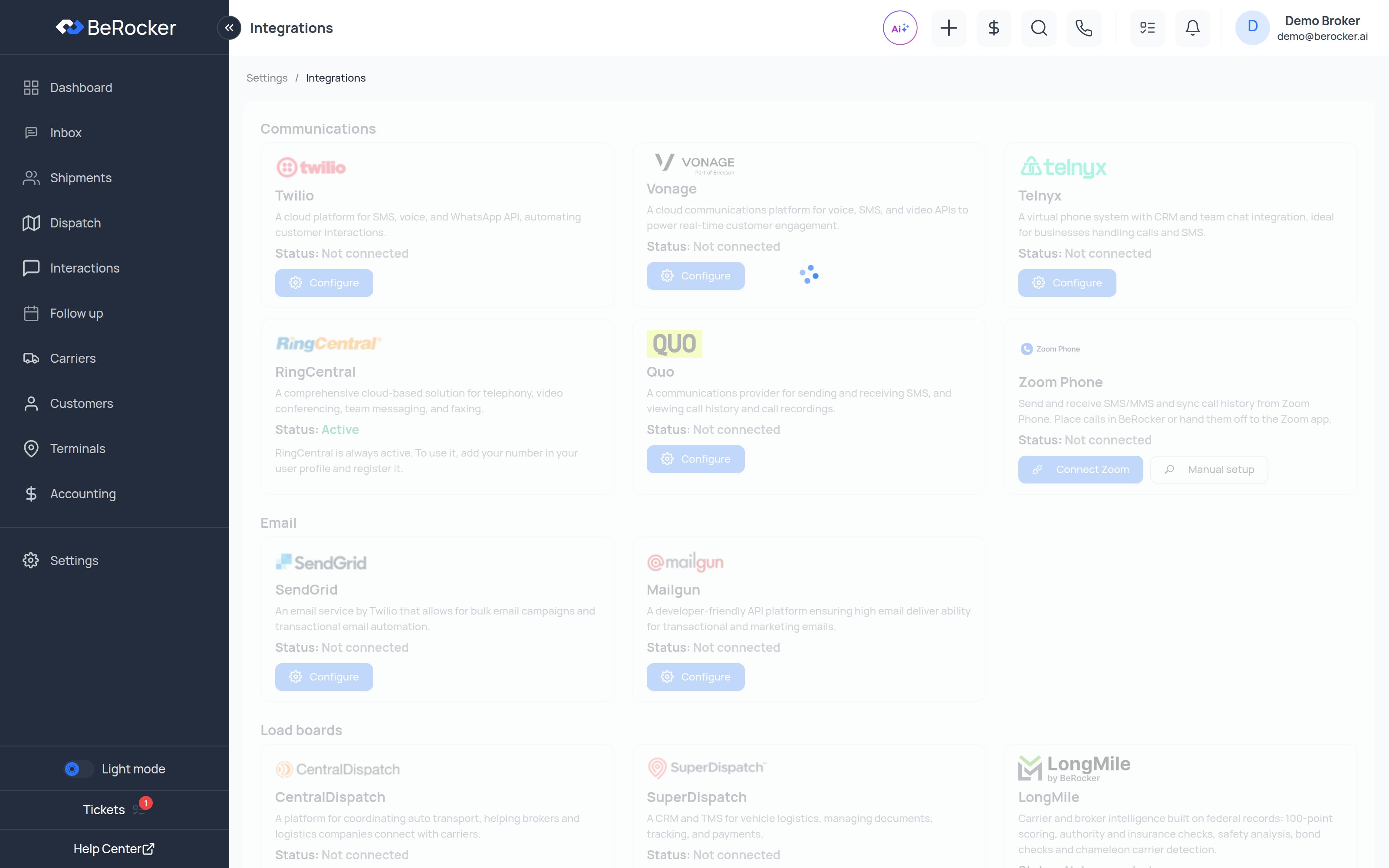 Every card shows the provider, a one-line description, its **Status** (**Active** or
**Not connected**), and a **Configure** or **Integrate** button.
You only need the services you actually use. For a working CRM you need at least **one
communication provider** and **one email provider**.
***
## Communications
| Provider | What it does |
| --------------- | ------------------------------------------------------------------------------------------------------------------------- |
| **Twilio** | A cloud platform for SMS, voice and WhatsApp API, automating customer interactions. |
| **Vonage** | A cloud communications platform for voice, SMS and video APIs. |
| **Telnyx** | A virtual phone system with CRM and team chat integration, for businesses handling calls and SMS. |
| **RingCentral** | Cloud telephony, video conferencing, team messaging and faxing. |
| **Quo** | Sending and receiving SMS, plus call history and call recordings. |
| **Zoom Phone** | Send and receive SMS/MMS and sync call history from Zoom Phone. Place calls in BeRocker or hand them off to the Zoom app. |
**RingCentral is always shown as Active.** There is nothing to configure on this page — instead,
add your RingCentral number in **Settings → Profile → User Contacts** and click **Register**
next to it. See [Profile](/settings/profile).
Setup guides: [Twilio](/integrations/phone/how-to-configure-twilio) ·
[RingCentral](/integrations/phone/add-ring-central-phone-numbers) ·
[Telnyx](/integrations/phone/telnyx/telnyx-setup) ·
[Vonage](/integrations/phone/vonage-add-user) ·
[Zoom Phone](/integrations/phone/zoom-phone)
***
## Email
| Provider | What it does |
| ------------ | ---------------------------------------------------------------------------------------------- |
| **SendGrid** | An email service by Twilio for bulk campaigns and transactional email automation. |
| **Gmail** | Send and receive chat emails through each team member's own Gmail or Google Workspace mailbox. |
| **Mailgun** | A developer-friendly API platform for transactional and marketing email deliverability. |
Setup guides: [SendGrid](/integrations/email/sendgrid/sendgrid-setup) ·
[Mailgun](/integrations/email/mailgun/how-to-configure-mailgun-in-berocker-settings) ·
[Gmail](/integrations/email/gmail)
Before you send a single campaign, read
[Email deliverability](/integrations/email/sendgrid/email-deliveribility). Getting SPF, DKIM and
DMARC right is the difference between the inbox and the spam folder.
***
## Load boards
| Provider | What it does |
| ------------------- | -------------------------------------------------------------------------------------------------------------------------------------------------------------------------- |
| **CentralDispatch** | Coordinating auto transport — connecting brokers and logistics companies with carriers. |
| **SuperDispatch** | A CRM and TMS for vehicle logistics, managing documents, tracking and payments. |
| **LongMile** | Carrier and broker intelligence built on federal records: 100-point scoring, authority and insurance checks, safety analysis, bond checks and chameleon carrier detection. |
Setup guides: [Central Dispatch](/integrations/loadboards/centraldispatch) ·
[Super Dispatch](/integrations/loadboards/superdispatch) ·
[LongMile](/integrations/loadboards/longmile)
Posting behaviour — auto-unposting, order import and price updates — is configured separately in
[Carriers and Loadboards](/settings/carriers-and-loadboards).
***
## Payment Gateway
> Expand your business by accepting payments from customers.
**Configure** opens **Settings → Integrations → Payment Gateways**, where you connect the
processors and choose your default.
Every card shows the provider, a one-line description, its **Status** (**Active** or
**Not connected**), and a **Configure** or **Integrate** button.
You only need the services you actually use. For a working CRM you need at least **one
communication provider** and **one email provider**.
***
## Communications
| Provider | What it does |
| --------------- | ------------------------------------------------------------------------------------------------------------------------- |
| **Twilio** | A cloud platform for SMS, voice and WhatsApp API, automating customer interactions. |
| **Vonage** | A cloud communications platform for voice, SMS and video APIs. |
| **Telnyx** | A virtual phone system with CRM and team chat integration, for businesses handling calls and SMS. |
| **RingCentral** | Cloud telephony, video conferencing, team messaging and faxing. |
| **Quo** | Sending and receiving SMS, plus call history and call recordings. |
| **Zoom Phone** | Send and receive SMS/MMS and sync call history from Zoom Phone. Place calls in BeRocker or hand them off to the Zoom app. |
**RingCentral is always shown as Active.** There is nothing to configure on this page — instead,
add your RingCentral number in **Settings → Profile → User Contacts** and click **Register**
next to it. See [Profile](/settings/profile).
Setup guides: [Twilio](/integrations/phone/how-to-configure-twilio) ·
[RingCentral](/integrations/phone/add-ring-central-phone-numbers) ·
[Telnyx](/integrations/phone/telnyx/telnyx-setup) ·
[Vonage](/integrations/phone/vonage-add-user) ·
[Zoom Phone](/integrations/phone/zoom-phone)
***
## Email
| Provider | What it does |
| ------------ | ---------------------------------------------------------------------------------------------- |
| **SendGrid** | An email service by Twilio for bulk campaigns and transactional email automation. |
| **Gmail** | Send and receive chat emails through each team member's own Gmail or Google Workspace mailbox. |
| **Mailgun** | A developer-friendly API platform for transactional and marketing email deliverability. |
Setup guides: [SendGrid](/integrations/email/sendgrid/sendgrid-setup) ·
[Mailgun](/integrations/email/mailgun/how-to-configure-mailgun-in-berocker-settings) ·
[Gmail](/integrations/email/gmail)
Before you send a single campaign, read
[Email deliverability](/integrations/email/sendgrid/email-deliveribility). Getting SPF, DKIM and
DMARC right is the difference between the inbox and the spam folder.
***
## Load boards
| Provider | What it does |
| ------------------- | -------------------------------------------------------------------------------------------------------------------------------------------------------------------------- |
| **CentralDispatch** | Coordinating auto transport — connecting brokers and logistics companies with carriers. |
| **SuperDispatch** | A CRM and TMS for vehicle logistics, managing documents, tracking and payments. |
| **LongMile** | Carrier and broker intelligence built on federal records: 100-point scoring, authority and insurance checks, safety analysis, bond checks and chameleon carrier detection. |
Setup guides: [Central Dispatch](/integrations/loadboards/centraldispatch) ·
[Super Dispatch](/integrations/loadboards/superdispatch) ·
[LongMile](/integrations/loadboards/longmile)
Posting behaviour — auto-unposting, order import and price updates — is configured separately in
[Carriers and Loadboards](/settings/carriers-and-loadboards).
***
## Payment Gateway
> Expand your business by accepting payments from customers.
**Configure** opens **Settings → Integrations → Payment Gateways**, where you connect the
processors and choose your default.
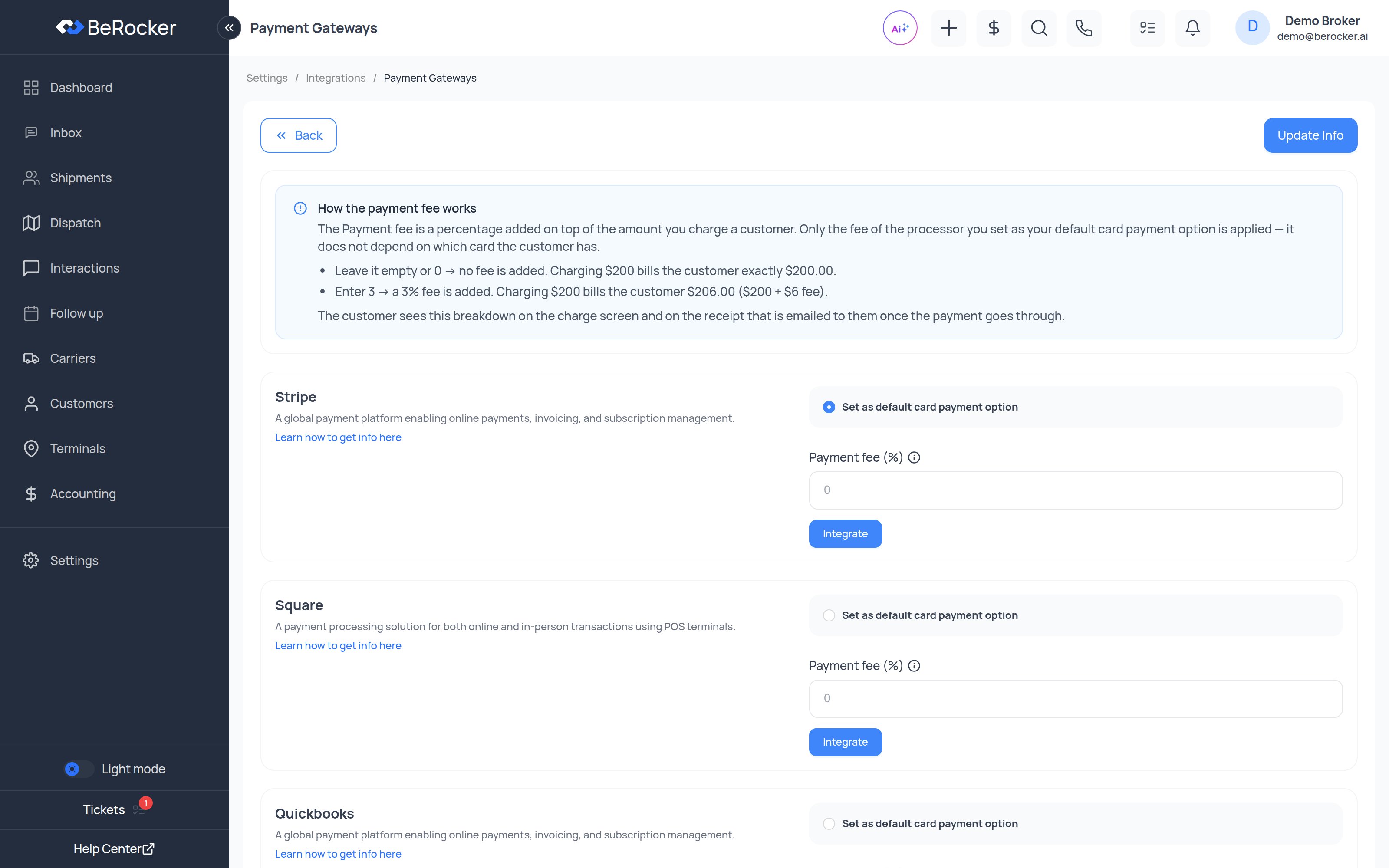 | Processor | Type |
| ------------------------------------------------------------- | --------------------------------------------------- |
| [Stripe](/integrations/payment/stripe) | Charges the card |
| [Square](/integrations/payment/square) | Charges the card |
| [Authorize.Net](/integrations/payment/authorize-net) | Charges the card |
| [RevitPay](/integrations/payment/revitpay) | Charges the card |
| [QuickBooks](/integrations/payment/quickbooks) | Charges the card, plus accounting sync |
| [Zelle and other manual methods](/integrations/payment/zelle) | Record-only — Zelle, Venmo, PayPal, Cash App, Other |
Only **Stripe**, **Square** and **Authorize.Net** can tell whether a saved card is credit, debit or
prepaid. If you pass card processing fees on to customers and waive them for debit, your default
processor has to be one of those three. See [Accounting](/using/accounting).
***
## Reconnecting
OAuth connections expire or get revoked. When one does, BeRocker shows a banner asking you to
reconnect. Reconnect it rather than dismissing the banner — a disconnected load board silently stops
posting.
***
## FAQ
The CRM cannot send messages, place calls or post to load boards. Integrations are not optional
extras — they are what makes the CRM do anything.
Yes. Disconnect and connect a different one from this page at any time. Remember to update your
team's **User Contacts** to point at the new provider.
The card shows **Status: Active** in green.
Yes. RingCentral for calls and Twilio for SMS is a common setup. Each user contact picks its own
provider.
***
## Related
Point your own number at a connected provider.
How posting behaves once the boards are connected.
Use BeRocker from Claude.
Turn provider emails into leads.
| Processor | Type |
| ------------------------------------------------------------- | --------------------------------------------------- |
| [Stripe](/integrations/payment/stripe) | Charges the card |
| [Square](/integrations/payment/square) | Charges the card |
| [Authorize.Net](/integrations/payment/authorize-net) | Charges the card |
| [RevitPay](/integrations/payment/revitpay) | Charges the card |
| [QuickBooks](/integrations/payment/quickbooks) | Charges the card, plus accounting sync |
| [Zelle and other manual methods](/integrations/payment/zelle) | Record-only — Zelle, Venmo, PayPal, Cash App, Other |
Only **Stripe**, **Square** and **Authorize.Net** can tell whether a saved card is credit, debit or
prepaid. If you pass card processing fees on to customers and waive them for debit, your default
processor has to be one of those three. See [Accounting](/using/accounting).
***
## Reconnecting
OAuth connections expire or get revoked. When one does, BeRocker shows a banner asking you to
reconnect. Reconnect it rather than dismissing the banner — a disconnected load board silently stops
posting.
***
## FAQ
The CRM cannot send messages, place calls or post to load boards. Integrations are not optional
extras — they are what makes the CRM do anything.
Yes. Disconnect and connect a different one from this page at any time. Remember to update your
team's **User Contacts** to point at the new provider.
The card shows **Status: Active** in green.
Yes. RingCentral for calls and Twilio for SMS is a common setup. Each user contact picks its own
provider.
***
## Related
Point your own number at a connected provider.
How posting behaves once the boards are connected.
Use BeRocker from Claude.
Turn provider emails into leads.