> ## Documentation Index
> Fetch the complete documentation index at: https://help.berocker.com/llms.txt
> Use this file to discover all available pages before exploring further.
# Carriers and Loadboards
> Auto-unposting, Super Dispatch order import, load board price updates, and the Super Dispatch sync list.
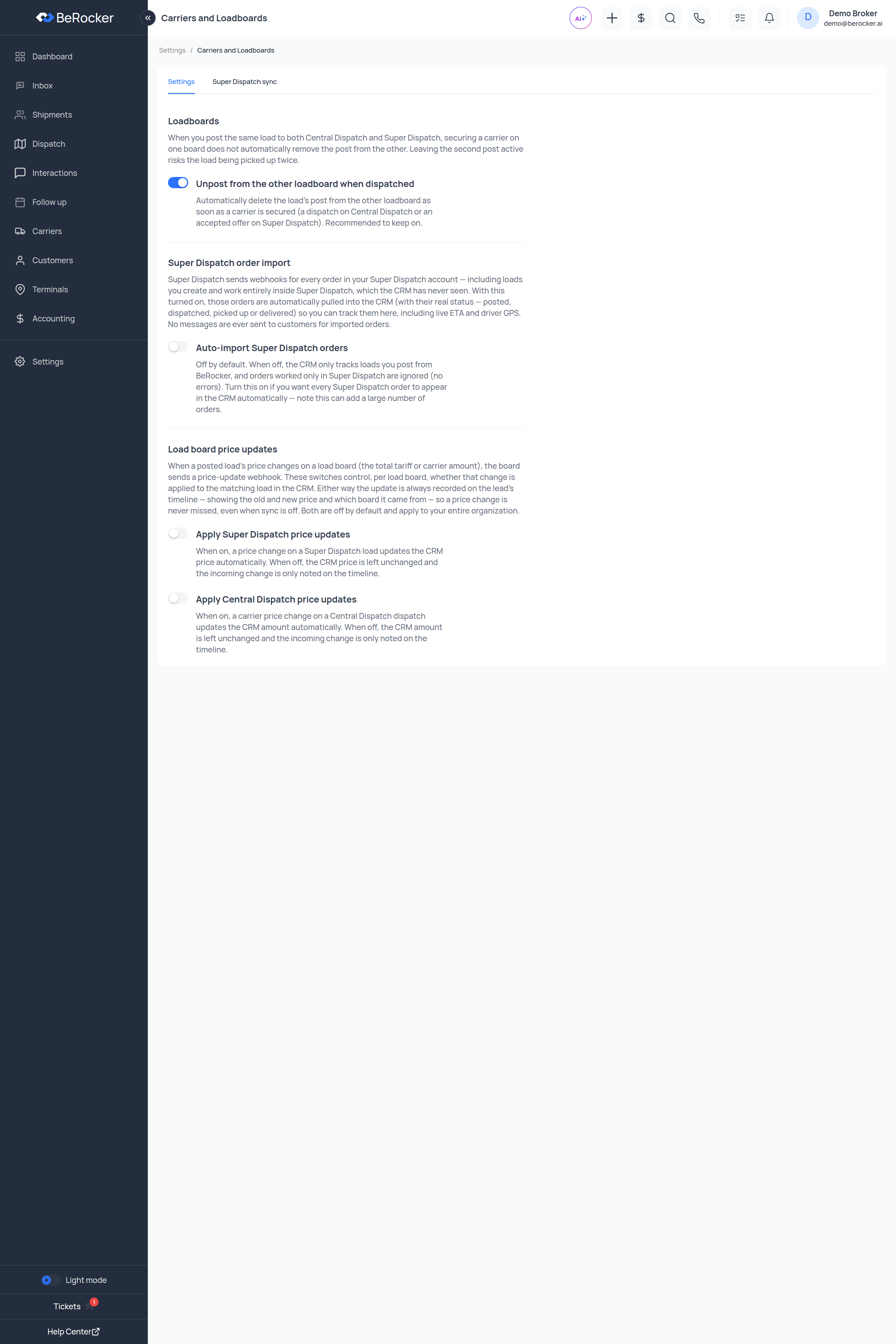
**Settings → Carriers and Loadboards** governs how BeRocker and your load boards keep each other
honest. Two tabs: **Settings** and **Super Dispatch sync**.
 ***
## Loadboards
### Unpost from the other loadboard when dispatched
> When you post the same load to both Central Dispatch and Super Dispatch, securing a carrier on one
> board does not automatically remove the post from the other. Leaving the second post active risks
> the load being picked up twice.
With this on, BeRocker automatically deletes the load's post from the other board as soon as a
carrier is secured — a dispatch on Central Dispatch, or an accepted offer on Super Dispatch.
**Recommended to keep on.** The alternative is fielding calls about a load that is already covered
— or worse, two trucks showing up.
***
## Super Dispatch order import
> Super Dispatch sends webhooks for every order in your Super Dispatch account — including loads you
> create and work entirely inside Super Dispatch, which the CRM has never seen.
**Auto-import Super Dispatch orders** — off by default.
| Setting | What happens |
| ------- | ---------------------------------------------------------------------------------------------------------------------------------------------------------------------------------- |
| **Off** | The CRM only tracks loads you post from BeRocker. Orders worked only in Super Dispatch are ignored, with no errors. |
| **On** | Every Super Dispatch order is pulled into the CRM with its real status — posted, dispatched, picked up or delivered — so you can track it here, including live ETA and driver GPS. |
Turning it on can add a **large number** of orders at once, depending on how much you do outside
the CRM. No messages are ever sent to customers for imported orders, so there is no risk of
texting somebody by surprise — but your Shipments table will grow.
***
## Load board price updates
> When a posted load's price changes on a load board (the total tariff or carrier amount), the board
> sends a price-update webhook. These switches control, per load board, whether that change is
> applied to the matching load in the CRM.
* **Apply Super Dispatch price updates**
* **Apply Central Dispatch price updates**
Both are **off by default** and apply to your entire organization.
Either way, the update is **always recorded on the lead's timeline** — showing the old price, the
new price and which board it came from. Turning the switch off means the CRM does not silently
change its own number; it never means the change goes unnoticed.
Leave these off if the CRM price is your source of truth for invoicing, and use the timeline entry
to decide case by case. Turn them on if you routinely renegotiate on the board.
***
## Super Dispatch sync
The second tab lists Super Dispatch orders that could not be brought into the CRM automatically, so
they do not just disappear.
Columns: **Order #**, **SD status**, **Details**, **Synced**, **Actions**. Search by order number or
status.
For each row you can retry the sync, or remove the entry from the list.
**Removing an entry only clears the list** — it does not affect the order in Super Dispatch.
Common messages:
| Message | Meaning |
| --------------------------------------- | ------------------------------------------------------------------------------------- |
| **Order already exists in the CRM** | Nothing to do; it is already tracked. |
| **The order still could not be synced** | Something in the order is missing or malformed — open it in Super Dispatch and check. |
***
## Related
Connecting the board.
Connecting the board.
Live GPS and ETA come from Super Dispatch.
Your carrier book.
***
## Loadboards
### Unpost from the other loadboard when dispatched
> When you post the same load to both Central Dispatch and Super Dispatch, securing a carrier on one
> board does not automatically remove the post from the other. Leaving the second post active risks
> the load being picked up twice.
With this on, BeRocker automatically deletes the load's post from the other board as soon as a
carrier is secured — a dispatch on Central Dispatch, or an accepted offer on Super Dispatch.
**Recommended to keep on.** The alternative is fielding calls about a load that is already covered
— or worse, two trucks showing up.
***
## Super Dispatch order import
> Super Dispatch sends webhooks for every order in your Super Dispatch account — including loads you
> create and work entirely inside Super Dispatch, which the CRM has never seen.
**Auto-import Super Dispatch orders** — off by default.
| Setting | What happens |
| ------- | ---------------------------------------------------------------------------------------------------------------------------------------------------------------------------------- |
| **Off** | The CRM only tracks loads you post from BeRocker. Orders worked only in Super Dispatch are ignored, with no errors. |
| **On** | Every Super Dispatch order is pulled into the CRM with its real status — posted, dispatched, picked up or delivered — so you can track it here, including live ETA and driver GPS. |
Turning it on can add a **large number** of orders at once, depending on how much you do outside
the CRM. No messages are ever sent to customers for imported orders, so there is no risk of
texting somebody by surprise — but your Shipments table will grow.
***
## Load board price updates
> When a posted load's price changes on a load board (the total tariff or carrier amount), the board
> sends a price-update webhook. These switches control, per load board, whether that change is
> applied to the matching load in the CRM.
* **Apply Super Dispatch price updates**
* **Apply Central Dispatch price updates**
Both are **off by default** and apply to your entire organization.
Either way, the update is **always recorded on the lead's timeline** — showing the old price, the
new price and which board it came from. Turning the switch off means the CRM does not silently
change its own number; it never means the change goes unnoticed.
Leave these off if the CRM price is your source of truth for invoicing, and use the timeline entry
to decide case by case. Turn them on if you routinely renegotiate on the board.
***
## Super Dispatch sync
The second tab lists Super Dispatch orders that could not be brought into the CRM automatically, so
they do not just disappear.
Columns: **Order #**, **SD status**, **Details**, **Synced**, **Actions**. Search by order number or
status.
For each row you can retry the sync, or remove the entry from the list.
**Removing an entry only clears the list** — it does not affect the order in Super Dispatch.
Common messages:
| Message | Meaning |
| --------------------------------------- | ------------------------------------------------------------------------------------- |
| **Order already exists in the CRM** | Nothing to do; it is already tracked. |
| **The order still could not be synced** | Something in the order is missing or malformed — open it in Super Dispatch and check. |
***
## Related
Connecting the board.
Connecting the board.
Live GPS and ETA come from Super Dispatch.
Your carrier book.