> ## Documentation Index
> Fetch the complete documentation index at: https://help.berocker.com/llms.txt
> Use this file to discover all available pages before exploring further.
# Lead source API
> POST leads into BeRocker from your website or a lead provider, using the endpoint URL each lead source gives you.
Every [lead source](/settings/lead-sources) you create in BeRocker gets its own **endpoint URL**.
POST a lead to that URL and it lands in the CRM, attributed to that source, and gets distributed to
an agent.
***
## 1. Get your endpoint URL
**Settings → Lead Management → Lead sources → + Add new source**. Give it a name; optionally a
plan name and per-lead price.
In the **URLs** column, click the copy icon next to **Lead save URL**.
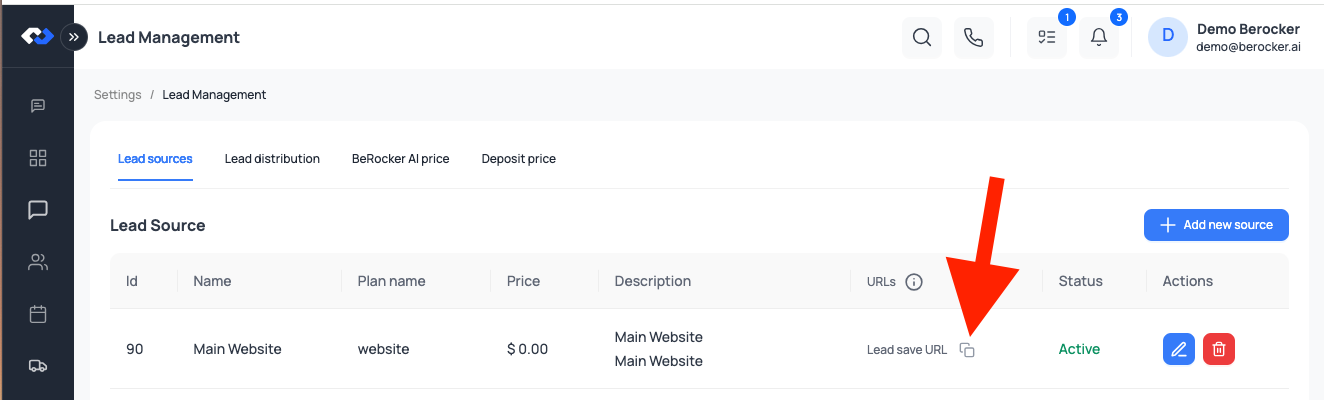 The URL looks like:
```text theme={null}
https://app.berocker.com/api/v1/client/webhooks/lead//save
```
The key is embedded in the URL, so authentication is built in — there is no separate token to send.
Some sources also expose a **hot lead** URL for providers that flag urgent leads.
Treat the URL like a password. Anyone who has it can create leads in your account. If it leaks,
delete the source and create a new one.
***
## 2. Request
```http theme={null}
POST /api/v1/client/webhooks/lead//save
Content-Type: application/json
```
***
## 3. Payload
### Required
| Field | Type | Notes |
| ------------ | ------ | ---------------------------------------------------- |
| `first_name` | string | Must not be empty. |
| `phone` | string | Normalised on arrival; any common US format is fine. |
| `vehicles` | array | At least one vehicle. |
### Customer and route
| Field | Type | Notes |
| --------------------------------------- | ------ | ------------------------------------------------------------------------ |
| `last_name` | string | |
| `email` | string | |
| `additional_phone` | string | A second number for the customer. |
| `origin_city`, `origin_state` | string | Optional if you send a ZIP — BeRocker back-fills city and state from it. |
| `origin_postal_code` | string | |
| `origin_address` | string | Full street address, or just a ZIP. |
| `destination_city`, `destination_state` | string | |
| `destination_postal_code` | string | |
| `destination_address` | string | |
| `origin_country`, `destination_country` | string | Default `US`. |
### The shipment
| Field | Type | Notes |
| ---------------------- | ------- | ---------------------------------------------------------- |
| `ship_date` | date | The requested pickup date. |
| `drop_off_date` | date | |
| `transport_type` | string | `open` (default) or `enclosed`. |
| `comment_from_shipper` | string | Free text from the customer. |
| `customer_comments` | string | |
| `secondary_id` | string | Your own reference — shown as **Secondary ID** in the CRM. |
| `booking_number` | string | |
| `lead_cost` | integer | What this particular lead cost you, if it varies per lead. |
| `customer_id_type` | string | `passport`, `driver_license` or `national_id`. |
| `customer_id_number` | string | |
### Each vehicle
| Field | Type | Notes |
| -------------------- | ------- | ------------------------------------------------------------ |
| `vehicle_model_year` | integer | |
| `vehicle_make` | string | Also accepted as `make`. |
| `vehicle_model` | string | Also accepted as `model`. |
| `vehicle_type` | string | See the list below. |
| `vehicle_inop` | boolean | `true` if the vehicle does not run. |
| `vin` | string | |
| `is_custom` | boolean | `true` for a free-text vehicle that is not in the catalogue. |
**Vehicle types:** `Car`, `sedan`, `Coupe`, `Convertible`, `SUV`, `Van`, `Pickup`,
`pickup_2_doors`, `pickup_4_doors`, `Motorcycle`, `ATV`, `Boat`, `RV`, `Travel Trailer`, `Other`.
A lead containing a **custom** vehicle skips the automatic quote and is routed to an agent for
manual pricing instead — a travel trailer should not be auto-quoted like a sedan.
***
## 4. Example
```bash theme={null}
curl -X POST "https://app.berocker.com/api/v1/client/webhooks/lead//save" \
-H "Content-Type: application/json" \
-d '{
"first_name": "John",
"last_name": "Doe",
"email": "user@example.com",
"phone": "5551234567",
"origin_city": "Los Angeles",
"origin_state": "CA",
"origin_postal_code": "90001",
"destination_city": "Miami",
"destination_state": "FL",
"destination_postal_code": "33101",
"ship_date": "2026-09-27",
"transport_type": "open",
"comment_from_shipper": "Please call after 5 PM",
"secondary_id": "WEB-10482",
"vehicles": [
{
"vehicle_model_year": 2020,
"vehicle_make": "Toyota",
"vehicle_model": "Camry",
"vehicle_type": "Car",
"vehicle_inop": false
}
]
}'
```
***
## 5. What happens next
Attributed to the source whose URL you posted to.
Per your [lead distribution](/settings/lead-distribution) rota — quotas, shift hours, and the
after-hours fallback.
If **Auto Price** is on in [Pricing](/settings/pricing), and no vehicle is custom.
In [Inbox](/using/inbox) as a conversation and in [Shipments](/using/shipments) as a row.
***
## Testing and troubleshooting
Send one lead with your own name and phone number and watch it arrive.
| Symptom | Check |
| -------------------------------- | ------------------------------------------------------------------------------------------------------- |
| 404 | The URL, including the key and the trailing `/save`. |
| Validation error | `first_name`, `phone` and at least one vehicle are all required. |
| Lead arrives but is not assigned | Distribution quotas are 0, or you are outside shift hours with no fallback. |
| Vehicle type is wrong | `vehicle_type` is not one of the listed values — BeRocker matches loosely, but exact values are safest. |
| City and state are empty | Send `origin_postal_code` / `destination_postal_code` and they will be filled in. |
| Nothing arrived at all | Check **Settings → Lead Management → Logs** — the raw payload is recorded there. |
If your provider emails leads instead of posting them, use
[Email parsing](/settings/email-parsing) rather than this API.
***
## Related
Create the source and get the URL.
Who receives these leads.
The URL looks like:
```text theme={null}
https://app.berocker.com/api/v1/client/webhooks/lead//save
```
The key is embedded in the URL, so authentication is built in — there is no separate token to send.
Some sources also expose a **hot lead** URL for providers that flag urgent leads.
Treat the URL like a password. Anyone who has it can create leads in your account. If it leaks,
delete the source and create a new one.
***
## 2. Request
```http theme={null}
POST /api/v1/client/webhooks/lead//save
Content-Type: application/json
```
***
## 3. Payload
### Required
| Field | Type | Notes |
| ------------ | ------ | ---------------------------------------------------- |
| `first_name` | string | Must not be empty. |
| `phone` | string | Normalised on arrival; any common US format is fine. |
| `vehicles` | array | At least one vehicle. |
### Customer and route
| Field | Type | Notes |
| --------------------------------------- | ------ | ------------------------------------------------------------------------ |
| `last_name` | string | |
| `email` | string | |
| `additional_phone` | string | A second number for the customer. |
| `origin_city`, `origin_state` | string | Optional if you send a ZIP — BeRocker back-fills city and state from it. |
| `origin_postal_code` | string | |
| `origin_address` | string | Full street address, or just a ZIP. |
| `destination_city`, `destination_state` | string | |
| `destination_postal_code` | string | |
| `destination_address` | string | |
| `origin_country`, `destination_country` | string | Default `US`. |
### The shipment
| Field | Type | Notes |
| ---------------------- | ------- | ---------------------------------------------------------- |
| `ship_date` | date | The requested pickup date. |
| `drop_off_date` | date | |
| `transport_type` | string | `open` (default) or `enclosed`. |
| `comment_from_shipper` | string | Free text from the customer. |
| `customer_comments` | string | |
| `secondary_id` | string | Your own reference — shown as **Secondary ID** in the CRM. |
| `booking_number` | string | |
| `lead_cost` | integer | What this particular lead cost you, if it varies per lead. |
| `customer_id_type` | string | `passport`, `driver_license` or `national_id`. |
| `customer_id_number` | string | |
### Each vehicle
| Field | Type | Notes |
| -------------------- | ------- | ------------------------------------------------------------ |
| `vehicle_model_year` | integer | |
| `vehicle_make` | string | Also accepted as `make`. |
| `vehicle_model` | string | Also accepted as `model`. |
| `vehicle_type` | string | See the list below. |
| `vehicle_inop` | boolean | `true` if the vehicle does not run. |
| `vin` | string | |
| `is_custom` | boolean | `true` for a free-text vehicle that is not in the catalogue. |
**Vehicle types:** `Car`, `sedan`, `Coupe`, `Convertible`, `SUV`, `Van`, `Pickup`,
`pickup_2_doors`, `pickup_4_doors`, `Motorcycle`, `ATV`, `Boat`, `RV`, `Travel Trailer`, `Other`.
A lead containing a **custom** vehicle skips the automatic quote and is routed to an agent for
manual pricing instead — a travel trailer should not be auto-quoted like a sedan.
***
## 4. Example
```bash theme={null}
curl -X POST "https://app.berocker.com/api/v1/client/webhooks/lead//save" \
-H "Content-Type: application/json" \
-d '{
"first_name": "John",
"last_name": "Doe",
"email": "user@example.com",
"phone": "5551234567",
"origin_city": "Los Angeles",
"origin_state": "CA",
"origin_postal_code": "90001",
"destination_city": "Miami",
"destination_state": "FL",
"destination_postal_code": "33101",
"ship_date": "2026-09-27",
"transport_type": "open",
"comment_from_shipper": "Please call after 5 PM",
"secondary_id": "WEB-10482",
"vehicles": [
{
"vehicle_model_year": 2020,
"vehicle_make": "Toyota",
"vehicle_model": "Camry",
"vehicle_type": "Car",
"vehicle_inop": false
}
]
}'
```
***
## 5. What happens next
Attributed to the source whose URL you posted to.
Per your [lead distribution](/settings/lead-distribution) rota — quotas, shift hours, and the
after-hours fallback.
If **Auto Price** is on in [Pricing](/settings/pricing), and no vehicle is custom.
In [Inbox](/using/inbox) as a conversation and in [Shipments](/using/shipments) as a row.
***
## Testing and troubleshooting
Send one lead with your own name and phone number and watch it arrive.
| Symptom | Check |
| -------------------------------- | ------------------------------------------------------------------------------------------------------- |
| 404 | The URL, including the key and the trailing `/save`. |
| Validation error | `first_name`, `phone` and at least one vehicle are all required. |
| Lead arrives but is not assigned | Distribution quotas are 0, or you are outside shift hours with no fallback. |
| Vehicle type is wrong | `vehicle_type` is not one of the listed values — BeRocker matches loosely, but exact values are safest. |
| City and state are empty | Send `origin_postal_code` / `destination_postal_code` and they will be filled in. |
| Nothing arrived at all | Check **Settings → Lead Management → Logs** — the raw payload is recorded there. |
If your provider emails leads instead of posting them, use
[Email parsing](/settings/email-parsing) rather than this API.
***
## Related
Create the source and get the URL.
Who receives these leads.